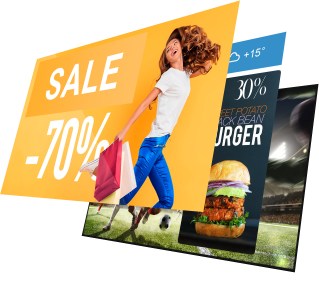
In DS-GO there are three playback modes. They work as three layers on the screen.
Priority
- Promotions: take over the whole screen
- Banners: small block over the base
- Your Offerings: base loop
What is Your Offerings?
This is the “base”: your items play full-screen in a loop. When the list ends, it starts again.
Use for:
- Menus and price lists
- Long-running offers (“always on”)
- Lists of services/products
- Full-screen YouTube videos
- Full-screen Instagram posts/Reels
If nothing is scheduled in Promotions, the screen always shows only Your Offerings.
Promotions: when you need content on a schedule
These are “timed inserts”. At the set moment, Promotions show full-screen, interrupting Your Offerings and Banners, then playback returns to what was running before.
Good for:
- Ad breaks during YouTube (e.g., every 5/10 minutes)
- Synchronized “super-wide” image/video across a row of multiple screens
- Short “today only/right now” campaigns
While a Promotion is active, banners are hidden. They return automatically after the promo ends.
Banners: a small panel over the base content
A small block in a dedicated area of the screen. It doesn’t pause or replace the base content; it appears on top of it.
Good for:
- “On sale now”, “Happy hour”, QR codes
- Small Instagram updates (posts/Reels as banners)
Banners are visible over Your Offerings and YouTube, but are hidden during Promotions.
Choosing a mode
- Want the screen to “live by itself” all day? → Your Offerings.
- Want a full-screen ad/announcement to appear on schedule? → Promotions.
- Want a gentle highlight while video/menu is playing? → Banners.
How it works together: examples
- Only Your Offerings: menus and offers loop all day.
- Your Offerings + Banners: menus and offers loop all day, and banners appear periodically in their area.
- YouTube + Promotions + Banners: YouTube plays; banners are visible; when promo time comes, the promo takes over the whole screen; after it ends. YouTube and banners continue.
- Row of screens: each screen has its own Your Offerings; on schedule a Promotion starts. All screens show one “super-wide” block; then each returns to its list.
Promotions are the most important (always on top). Banners sit over the base but below a promo. Your Offerings is what’s visible whenever nothing is covering it.